From an ADE to an Orchestrator: Building PABLO
My agents got faster. My brain did not.
Section intitulée where-we-left-offWhere we left off
In my previous article, I described my working environment: an Agent Development Environment, not an IDE with a chat panel bolted on, but a tool built around tasks, worktrees, and agents. I pick an issue, the ADE opens an isolated worktree with an agent already running, and I direct that agent instead of typing code. On top sit the agents I refined over months, all read-only by construction; build is the only one allowed to touch code.
The gains from these agents are concentrated in one place: understanding. At my job we have no focus teams, so anyone can be handed any task: a stock synchronization bug in the morning, a feature in code I have never opened in the afternoon, the next ticket in retail. Each task could be a different domain with its own business rules, and I switch between them three or four times a day. The task-analyst agent reads the ticket, its parents and the related code, then hands me the whole picture in one read.
Understanding a ticket is one thing, but a feature is not finished when the branch is pushed. Between code and production sits a second job made of waiting and checking: CI status, reviews, QA. All of that lives in GitHub and Jira, outside my worktrees. I had automated the thinking and kept the waiting.
This article is about the tool I built to close that gap: PABLO, a Symfony application. At its heart sits a state machine, something PHP developers have shipped for a decade under a less fashionable name than the one the AI ecosystem uses today.
Section intitulée the-chores-nobody-automatedThe chores nobody automated
Here is what my morning actually looked like: before writing a single line, I had to process a mental checklist across five or six open pull requests and two or three projects.
- Is CI green? The ADE only shows the status for the current worktree’s PR; the rest live in browser tabs.
- Has anyone reviewed them, and is it time to ask again without becoming the person who asks every ninety minutes?
- Has QA scheduled them, or broken them?
- Has feedback landed on the ticket? Find it, recreate a worktree for a branch I deleted last week.
- Is CI red? Then everything the agents do for me is useless until I get things moving myself: notice the failure, create a worktree, pick the agent, launch it, wait.
None of this is hard, and that is exactly the problem: each item costs a context switch, the thing I had spent a year eliminating. The minutes were never what hurt; what hurt was the interleaving: check CI, back to a task, remember no one has reviewed, back again.
My agents had stripped away the noise, making the work effortless to understand. But the cost of monitoring all those tasks was still mine. A dozen moving parts across three tools, and in that system, something has to poll. It was me.
Section intitulée enter-pabloEnter PABLO
So I made the poller: PABLO, for Personal Assistant for Boring Logic & Operations. The acronym came after the name, but boring is the honest word in it. Nothing PABLO does is clever: it looks at pull requests, reads timestamps, compares them with ten minutes ago, and concludes something changed.
The ADE is still where I work, and PABLO stays one level above it, answering a single question on a loop: given the state of this pull request, is there something an agent should be doing, and if so, which one? When the answer is yes, PABLO automatically launches that agent through the ADE CLI, in the right worktree, exactly as I would have.
Under the hood sits a Symfony console application with three entry points:
- the
pabloCLI; - the console;
- a small read-only dashboard.
There is one exception to that picture: /pablo-commit-and-pr is an OpenCode command, not a PABLO one. The agent writes the commit message and the pull request description (the only part of the flow where an agent beats plain code), then hands the task back to PABLO, which moves the task to the draft state and takes over.
And finally, a background scheduler (systemd on Linux, launchd on macOS) wakes the whole thing up every five minutes. State polling runs every ten minutes by default, the worktree sync every twelve. Both cadences live in each project’s YAML, and last-run stamps are written only on success, so failures simply retry on the next tick.
That separation matters more than it looks. PABLO only ever asks for an agent to be launched in a worktree and to be told when the run finishes, so everything PABLO knows about the ADE fits behind one interface: AgentLauncherInterface. The interface makes the ADE swappable: if a better one shows up next month, I rewrite one class. The swap already happened once: I was working with Orca before, and I work with OpenChamber nowadays. One coupling goes deeper: when the ADE refuses a worktree, the escape hatch is a headless opencode run. PABLO truly only depends on OpenCode.
Why PHP for a background daemon in 2026? It is the fastest language I think in, and the only user is me.
One last decision: PABLO stores no tokens and talks to no API. Everything comes through CLIs already authenticated on my machine (gh, acli, linear, orca, openchamber), so there is nothing to rotate or leak. When something is missing, pablo system:doctor says so, before a cron job fails quietly at 3 a.m.
The intelligence was always in the agents. What was missing was something dumb enough to run every five minutes forever without getting bored.
Section intitulée graph-engineering-or-a-state-machine-with-a-better-nameGraph engineering, or: a state machine with a better name
If you have read anything about AI agents lately, you have seen “graph engineering”: modeling work as nodes and edges instead of one enormous prompt. Strip away the fashionable vocabulary, and it is just a state machine.
Because software development is messy, PABLO’s state machine needs to be flexible. Several states need to easily fall back to draft, and a manual command might yank a task out of a state at any time. Heavy state machine frameworks require you to declare every single allowed transition upfront and block everything else. That is too rigid for my workflow, so I skipped the frameworks entirely and built a simple engine: states, transitions, and a loose rule about what is allowed from where.
In most agent frameworks, the nodes are reasoning steps (plan, search, summarize, critique), and the graph lives inside the task. In PABLO, the nodes are the states a pull request goes through in a real team: drafted, CI failing, waiting for review, changes requested, waiting for QA. The graph is not the agent: it is the process I already work in. That is what keeps the graph stable after the next model release, with prompts and models living inside the nodes.
So the state machine is a table. Literally one table, in one class:
State::Draft->value => ['emoji' => '📝', 'label' => 'draft',
                        'onEnter' => [self::class, 'enterDraft'], 'polled' => true],
State::CiRed->value => ['emoji' => '🔴', 'label' => 'ci-red',
                        'onEnter' => [self::class, 'enterCiRed'], 'polled' => true],
Each row of the table declares how to display the state, what runs on entry, and whether the poller watches it. Next to the first table, a second table says what each polled state may check:
public const POLL_CHECKS = [
    State::Draft->value         => ['checkCiRed', 'checkCiGreen'],
    State::CiRed->value         => ['checkCiGreen'],
    State::ReadyToReview->value => ['checkCiRed', 'checkReviews'],
    State::WaitingReview->value => ['checkCiRed', 'checkReviews'],
    State::NeedsTesting->value  => ['checkFailureSignal'],
];
That is the whole engine. Adding a step is a row and a method, not a refactor. The single on-enter handler is shared by the poller, the commands and manual overrides, so transitions never drift apart. Same idea for the trackers: one provider interface, and the state machine has no idea which tracker it is talking to.
Section intitulée the-states-and-what-wakes-them-upThe states, and what wakes them up
There are nine states. No todo, no init, on purpose: an issue I have not started has no task and just shows up in the list of what is assigned to me. Entering in-progress creates the task, the branch, the worktree and the first agent run; a merge closes the task from anywhere and deletes the worktree.
| State | Entered by | What happens on entry |
|---|---|---|
🔨 in-progress |
pablo task:start <issue-url> |
creates the branch and the worktree, runs task-analyst once, plus the project’s startup script if it has one |
🥱 waiting |
pablo task:waiting |
nothing, and polling stops. Toggling the state back restores the previous state |
📝 draft |
/pablo-commit-and-pr |
commit, push, draft pull request opened |
🔴 ci-red |
poller: CI is failing | runs ci-analyst on the failing checks and their logs |
👀 ready-to-review |
poller: CI is green | marks the pull request ready on GitHub, then settles immediately into the next state |
👀 waiting-review |
reached from the previous one | nothing, this is where a task waits for humans |
🧪 needs-testing |
poller: an approving review landed | records the timestamp that becomes the QA baseline |
🔁 request-changes |
poller: changes requested | flips the pull request back to draft, runs pr-feedback |
🚨 testing-failed |
poller: the QA failure signal fired | flips the pull request back to draft, runs task-feedback |
The shape of the thing, as a graph:
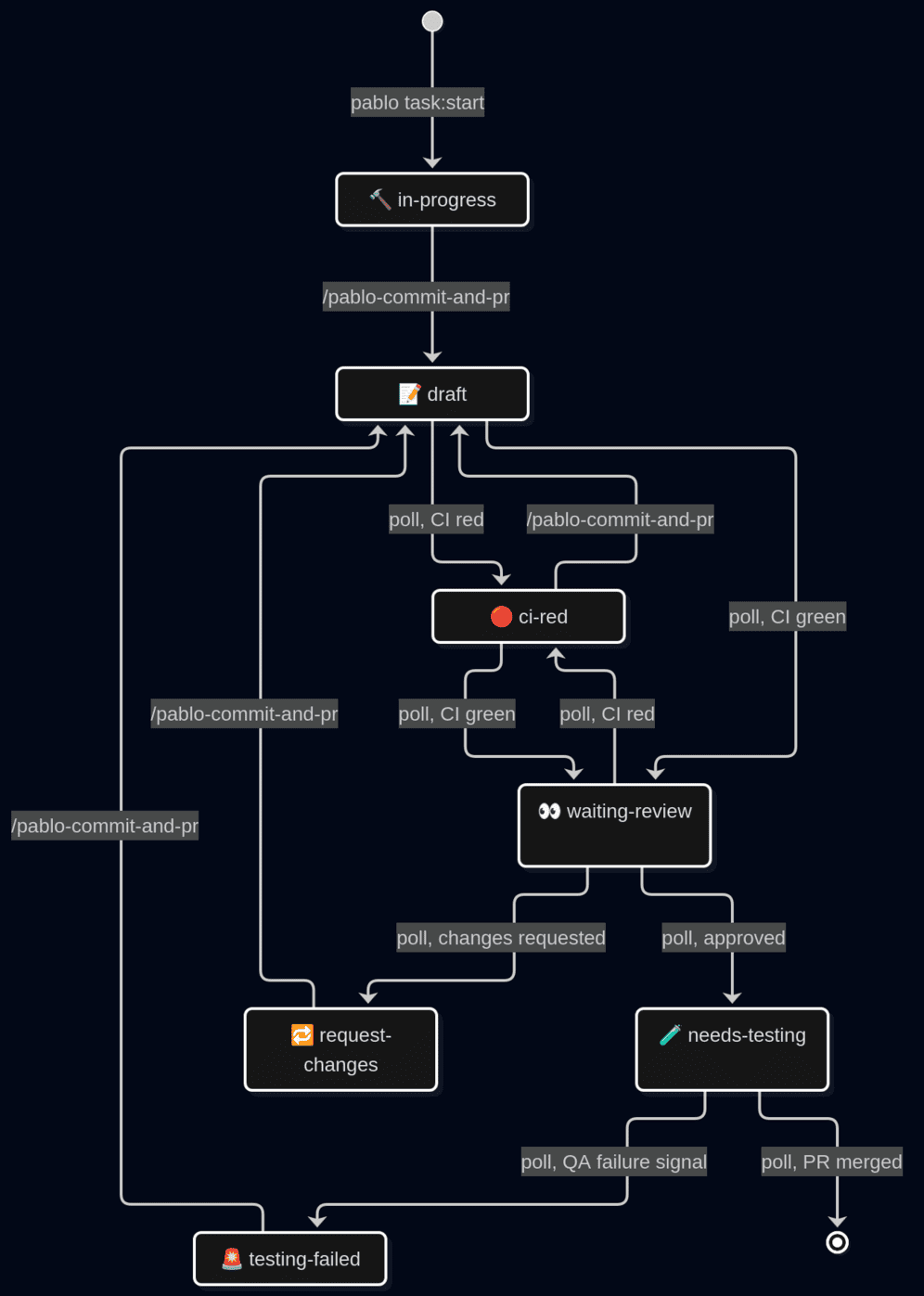
Look at the arrows, not the boxes: every arrow into draft is a command I typed; every other arrow is the poller. I decide when work leaves my hands; the machine handles the rest.
Three details took far more iterations than I expected.
The first: what counts as a review. My own reviews are excluded: replying to a comment on my own pull request creates a review under my name, which would otherwise send me back to draft just for answering a question. Bot reviews are ignored unless whitelisted. Only reviews after GitHub’s last ready_for_review timeline event count (a real timestamp, unlike the summary verdict), so a stale approval cannot leak into this round. The latest review per reviewer wins, and anything that is not an approval beats every approval: if someone took the trouble to write, I read the feedback before QA does.
The second: exactly one way back into draft, and it is a command. No push detection: a raw git push moves nothing. That sounds restrictive until you consider that I push dozens of times a day, often just to run CI. An explicit command is a signal. A push is noise.
The third: what I deliberately chose not to treat as events. CI pending triggers nothing. CI red in needs-testing triggers nothing either: a broken build will surface at merge time, and interrupting QA helps nobody. Half of designing a state machine is choosing what is not an event, and that half gets almost no attention.
Section intitulée what-quot-green-quot-actually-meansWhat “green” actually means
Two of those transitions hang on one question: is CI green? It sounds like a fact you look up. It is not.
My first version: red on failure, green when everything passes, pending otherwise. That rule worked everywhere except the project where I needed PABLO most.
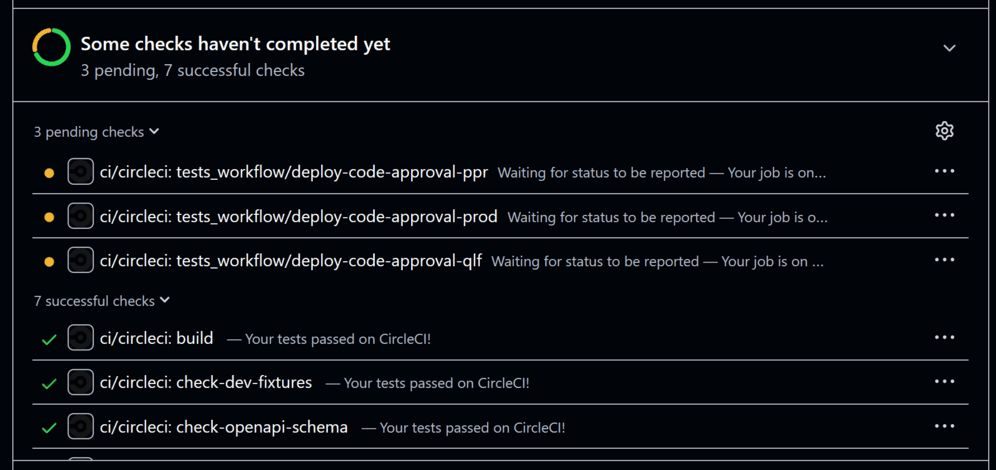
That project runs CircleCI, which publishes its deployment gates to GitHub as status contexts: deploy-code-approval-ppr, deploy-code-approval-qlf. These are manual gates on every pipeline, including feature branches where nobody clicks them (we do not deploy to qualification on every commit). They sit at PENDING forever, or arrive as ACTION_REQUIRED, which my rule counted as failure, so “Is CI green?” was never yes.
The fix is one line of configuration in PABLO:
ci:
  ignore_checks: ["approval"]
Any check whose name, workflow or status context contains that substring is dropped from the question entirely: it can neither turn the verdict red nor hold it at pending forever. Two gates, one word.
That single configuration key forced me to realize something: a green CI is a policy, not a fact. What GitHub calls a “CI check” is actually a noisy pile of unit tests, manual deployment gates, and chatty bots. Because no tool can magically guess which of those actually matter for a given branch, PABLO pushes that decision to the project’s YAML file. To keep the engine simple, I added two more blunt rules: a repository with zero checks is considered green, and the substring matching is kept intentionally dumb.
Section intitulée the-one-exception-to-my-own-dogmaThe one exception to my own dogma
In my previous article I made a point of my agents being read-only, not by instruction but by construction: the frontmatter (see my previous article to understand what a frontmatter is) denies edit and write. PABLO’s four analysts follow the same rule: cheap, fast model, forbidden from writing.
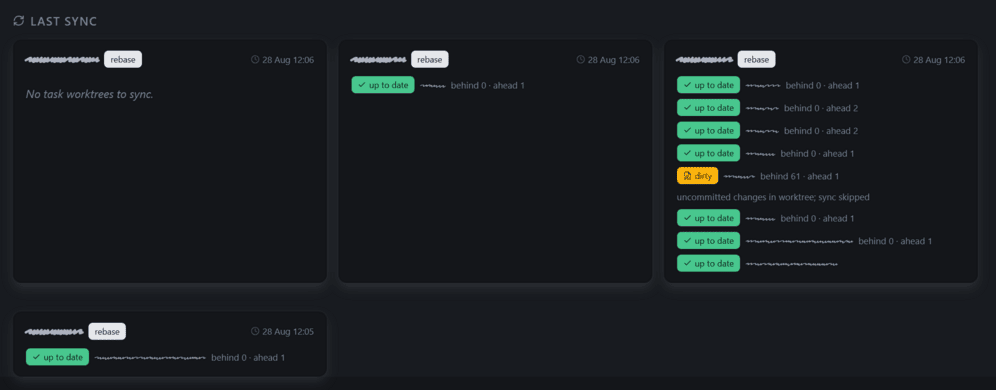
But there are five agents. The fifth is rebase-conflict-resolver, the only place where I broke my own rule on purpose. Every twelve hours, the sync job rebases each task worktree onto the primary branch. On a conflict, git aborts and resets the worktree, and an agent is launched to redo the rebase and resolve every conflict. Its frontmatter shows the cost: edit: allow, write: allow, git push*: allow.
Why let it in? The sync is a dry run by default. One configuration key turns the report into action: auto_apply: true, set only where I know the shape of the work.
Its blast radius is bounded like everything else. It may write code and push, but every command acting on the process rather than the code (merging, approving, commenting) is denied. It can rewrite my branch; it cannot approve it, merge it, or speak for me. The dangerous permission was never edit; it was acting as me in front of other people. Two more guard rails: a dirty branch (uncommitted files remaining) is never rebased, and when the agent takes over a rebase, PABLO prints a clear, copiable command to see the agent session in OpenCode.
Git does the remaining safety work. The push is always --force-with-lease, never a bare --force. If I pushed myself while the cron ran, the lease check fails, the worktree rolls back, and the job retries twelve hours later. My push always wins. When a conflict genuinely needs a human, the agent prints PABLO_CONFLICT_UNRESOLVABLE and pushes nothing.
The honest part: this agent can do damage, unlike the other four. I accept that risk because everything it writes lands in a pull request I review before merge. That is my own code. In exchange, I have not had a conflicting pull request in a while.
Section intitulée not-everything-deserves-an-llmNot everything deserves an LLM
In my previous article, I described two of my favorite agent commands: daily prompts that would call the gh CLI, parse my open pull requests, and use an LLM to write a polite Slack message asking the team for reviews and QA. It felt like magic at the time. Neither survived. They are now simply pablo show:prs: an ordinary PHP script reading from the poller’s cache, printing the exact same Slack-ready markdown with a review queue, a divider, and a QA queue. No LLM involved.
The same instinct shaped the web dashboard, rendered from the poller’s cache, and it leads to something I did not expect. A tool built to orchestrate AI agents turns out to be timestamps, file locks, parsed CLI output and a table of allowed transitions. The intelligence is in five markdown files; everything else is unglamorous plumbing that decides when to open the tap.
Section intitulée what-actually-changedWhat actually changed
The clearest difference: I did not check less, I stopped checking by myself.
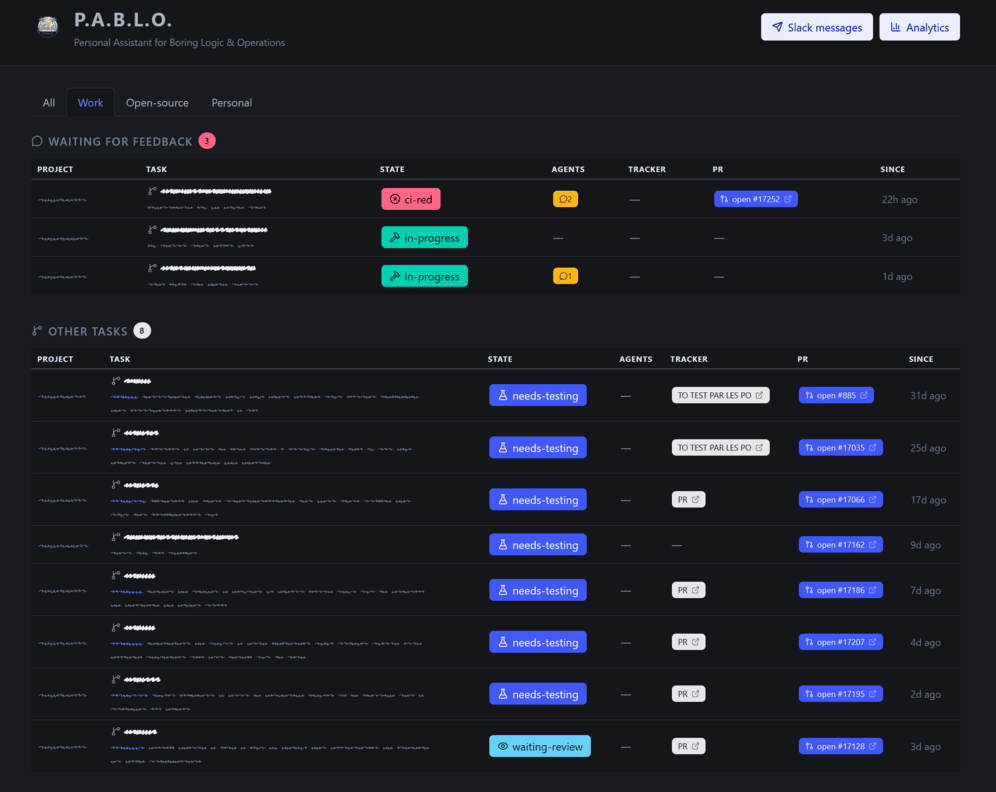
No walking my pull requests for red pipelines, no chasing reviews. One list, pablo tasks or the web dashboard, tells me what is waiting on me; everything else is somebody else’s turn.
The CI case alone made PABLO worth building. CI goes red at eleven at night, the poller notices within ten minutes and launches ci-analyst in the right worktree; by morning the diagnosis is waiting. The analysis was already automated by my agents; what changed is that the noticing and the waiting are automated too.
A full task now goes like this: pablo task:start on a Jira link, work with the agent, /pablo-commit-and-pr, and stop thinking about it.
pablo task:start https://acme.atlassian.net/browse/XXX-123Section intitulée brain-time-is-the-resourceBrain time is the resource
The hidden cost of modern development isn’t the three minutes it takes to check a CI pipeline; it’s the cognitive tax of keeping that tab open in the back of your head. Deep work requires long, unbroken stretches of attention. When you fracture it with administrative ping-pong: refreshing GitHub, chasing approvals, wondering if QA picked up your ticket. You aren’t just losing time, you are burning the exact mental energy you need to solve hard problems. I didn’t build PABLO just to write fewer bash commands, or to automate for its own sake. I built it to act as a cognitive shield. By offloading the bureaucracy of shipping to a dumb, relentless PHP loop, I stopped acting as a human router for my own tasks. I get to just be an engineer again.
Section intitulée pablo-is-publicPABLO is public
PABLO is public: github.com/korbeil/pablo. It is built for exactly one user, my team’s workflow, my CLIs, my tolerance for waiting; none of that is universal. Publishing it is like handing someone a well-kept config file: something to read, borrow from and break. The state machine is a table precisely so that yours can replace mine without a fight.
If you want to try it, the short version:
git clone https://github.com/korbeil/pablo && cd pablo
./bin/install.sh        # deps, agent/command links, starts the scheduler,
                        # finishes with pablo system:doctor
pablo system:doctor     # which CLI is missing or logged out
pablo project:new       # add a project; or drop a YAML in ~/.pablo/projects/
You need PHP 8.4+ and the CLIs (gh, acli, linear, opencode) each already authenticated. Then pablo task:start <issue-url> on something small, /pablo-commit-and-pr, and stop thinking about it. If you prefer a web dashboard over the CLI, pablo web serves it on port 8321.

Commentaires et discussions
Nos articles sur le même sujet
The Agent Development Environment: A New Unit of Work
The Agent Development Environment: A New Unit of Work Every few years, something comes along that changes what “writing code” means. This time, it might stop meaning writing at all. Where we come from…
par Baptiste Leduc
Nos formations sur ce sujet
Notre expertise est aussi disponible sous forme de formations professionnelles !

Maitriser les agents IA pour le développement
Comprendre le fonctionnement d’un agent, lui imposer vos standards, l’utiliser comme un allié sur la qualité du code et créer vos propres outils.

Maîtriser l’Intelligence Artificielle avec Symfony
Comprendre le fonctionnement des LLM, exploiter le composant Symfony/AI et connecter votre application aux grands modèles du marché.

L’IA pour développeurs frontend
Boostez votre productivité avec les meilleurs outils IA du moment et apprenez à construire vos propres assistants intelligents.