Customizing Sylius Grids – Improved DX with Grid Mutators

In Sylius, grids handle back-office list rendering: data fetching, column definitions, filters, actions, and more.
Sylius E-commerce ships with a large number of ready-to-use grids that can be customized to fit your project’s needs.
Until now, customization mainly relied on YAML configuration overrides or Grid events. These approaches still work, but they quickly hit their limits when you need to introduce business logic or benefit from a more modern, pleasant API.
With the upcoming release of GridBundle 1.16 — which will be integrated into Sylius 2.3 — a new approach becomes the official solution: Grid mutators. The old methods are now deprecated and will be phased out.
A Grid mutator is a PHP class that modifies an existing grid before it is built. It uses the same GridBuilder as PHP grids, providing a typed, easily testable API that feels familiar to Symfony developers.
In this article, we’ll look at why this change was necessary, the benefits of Grid mutators, and how to start using them today to prepare for future Sylius upgrades.
Section intitulée a-bit-of-historyA bit of history
Historically, Sylius grids are declared in the GridBundle configuration.
Sylius provides configuration files for every grid. You can see one of the configuration files in this example.
Although still very powerful, these config files don’t let you apply logic to grids — like restricting data based on the user’s profile.
Section intitulée php-gridsPHP grids
For many years now, the Grid component has offered the ability to configure grids using the Grid builder.
<?php

namespace App\Grid;

use App\Entity\Book;
use Sylius\Bundle\GridBundle\Builder\Field\StringField;
use Sylius\Bundle\GridBundle\Builder\GridBuilderInterface;
use Sylius\Component\Grid\Attribute\AsGrid;

#[AsGrid(
    name: 'app_book',
    resourceClass: Book::class
)]
final class UserGrid
{
    public function __invoke(GridBuilderInterface $gridBuilder): void
    {
        $gridBuilder
            ->orderBy('title', 'asc')
            ->withFields(
                StringField::create('title')
                    ->setLabel('Title'),
                StringField::create('author')
                    ->setLabel('Author'),
            )
        ;
    }
}
As you can see, the DX is very close to a Doctrine QueryBuilder or a Symfony FormBuilder.
Section intitulée the-benefitsThe benefits:
- bringing grids closer to FormBuilder and QueryBuilder;
- a typed API;
- better autocompletion;
- simpler testing;
- no more YAML array manipulation.
What’s more, we can now add business logic.
Examples:
if (!$this->authorizationChecker->isGranted('ROLE_SUPER_ADMIN')) {
    $gridBuilder->removeField('internalNotes');
}
or
if ($this->featureFlag->isEnabled('new_catalog')) {
    $gridBuilder->addField(...);
}
Section intitulée customizing-a-gridCustomizing a grid
Let’s use the product grid shipped by Sylius as an example.
As a hands-on example, I’d like to remove the image field — first using the old approach, then the new official way.
Section intitulée by-modifying-the-package-configBy modifying the package config
Since Sylius E-commerce grids are currently configured in Symfony config, you can use a configuration file to customize them.
Use the YAML file provided by Sylius Standard and add the following configuration:
# config/packages/_sylius.yaml
sylius_grid:
    grids:
        sylius_admin_product:
            fields:
                image:
                    enabled: false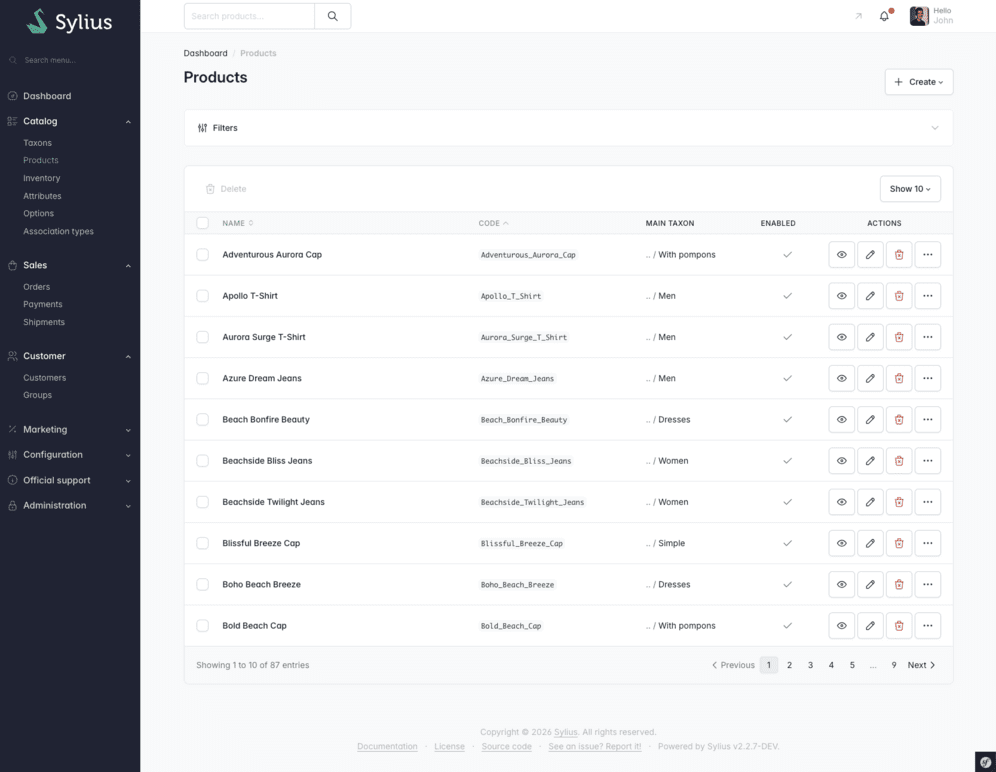
This is fairly simple in this basic case, but remember that this approach is deprecated in GridBundle 1.16.
To introduce the new way, let’s start by also using a Symfony config file, but this time with PHP.
<?php
// config/packages/sylius_grid.php

$gridBuilder = GridBuilder::create('sylius_admin_product')
    ->removeField('image')

return App::config(['sylius_grid' => (new GridConfig())->addGrid($gridBuilder)->toArray()]);
Here we’re using the App class provided by Symfony 7.4+ to modify the GridBundle config. There’s some boilerplate, but we can already see the removeField method that we’ll be able to use in Grid mutators.
This GridBuilder API isn’t limited to PHP config files — it’s exactly what Grid mutators leverage.
Section intitulée using-grid-mutatorsUsing Grid mutators
<?php

namespace App\Grid\Mutator;

use Sylius\Bundle\AdminBundle\Grid\ProductGridInterface
use Sylius\Bundle\GridBundle\Builder\GridBuilderInterface;
use Sylius\Component\Grid\Attribute\AsGridMutator;
use Sylius\Component\Grid\Mutator\GridMutatorInterface;

#[AsGridMutator(
    grid: 'sylius_admin_product',
    // or
    grid: ProductGridInterface::NAME // constant added in Sylius 2.3
)]
class RemoveImageFromProductGridMutator implements GridMutatorInterface
{
    public function __invoke(GridBuilderInterface $gridBuilder): void
    {
        $gridBuilder->removeField('image');
    }
}
As you can see, we simply use a PHP attribute provided by GridBundle, which injects the GridBuilder directly.
Sylius 2.3 will let you switch between grid configuration in config files (deprecated) and PHP. You can use mutators in both cases, making the transition smoother. You’ll likely need to migrate your grid configuration overrides to Grid mutators — which brings us to the next chapter.
Section intitulée converting-gridsConverting grids
If you use custom grids — grids not directly provided by Sylius — you need to create a new service with the AsGrid attribute. To help with this conversion, use the official tool: the Sylius Grid Converter.
And what about Sylius grid overrides? At the time of writing, the mutator option doesn’t exist yet, but it’s coming very soon!
Section intitulée what-about-grid-eventsWhat about Grid events?
Grid events are the old solution for customizing grids with PHP instead of overriding the YAML config. You had to listen for the GridDefinitionConverterEvent.
namespace App\Grid;

use Sylius\Component\Grid\Event\GridDefinitionConverterEvent;
use Sylius\Component\Grid\Definition\Field;
use Symfony\Component\EventDispatcher\Attribute\AsEventListener;

#[AsEventListener(event: 'sylius.grid.admin_product', method: 'editFields')]
final class RemoveImageFromProductGridListener
{
    public function editFields(GridDefinitionConverterEvent $event): void
    {
        $grid = $event->getGrid();

        $grid->removeField('image');
    }
}
This looks similar to Grid mutators, but you’re directly manipulating the Grid definition object instead of the GridBuilder. The builder provides more helpers to build this definition. Another downside of this event listener is having to guess the event name.
As mentioned earlier, these Grid events are deprecated in Sylius GridBundle 1.16, so get rid of them.
Section intitulée conclusionConclusion
Grid mutators finally provide a clear, typed, and testable way to customize Sylius grids. By building on the GridBuilder, they offer a modern API familiar to Symfony developers and much better suited to today’s needs than the old YAML overrides or Grid events.
With the arrival of GridBundle 1.16 and Sylius 2.3, they become the new official approach for evolving grids. Adoption can happen progressively, since they’re compatible with both YAML-declared grids and the new PHP grids.
If you start migrating your configuration overrides and Grid events to Grid mutators today, the transition to future Sylius versions will be much smoother. You’ll also benefit from a more enjoyable API that’s easier to maintain and debug day-to-day.
Commentaires et discussions
Ces clients ont profité de notre expertise

Dans le cadre de notre partenariat avec Carb0n, nous avons réalisé un examen complet de leur infrastructure, allant de l’environnement de production, jusqu’à au code de l’application. Nous avons fourni des recommandations stratégiques pour son amélioration. Notre intervention a notamment couvert : Évaluation et renforcement de la sécurité sur AWS, …

Studapart a fait appel à JoliCode pour surmonter plusieurs défis techniques que leur équipe interne ne pouvait gérer, faute de temps ou d’expertise. Nous avons travaillé ensemble pour améliorer leur processus d’onboarding des développeurs, résoudre des problématiques complexes de gestion des droits, et configurer correctement leurs certificats HTTP/HTTPS…

Nous avons accompagné le groupe Colliers dans la conception et le développement d’une application web, pensée pour leurs clients grands comptes. Cette plateforme permet à ces utilisateurs VIP d’accéder à des données de marché exclusives sur l’investissement immobilier et le marché locatif en Île-de-France. L’ensemble des données est présenté sous forme…