Secret Santa in 2026: exclusions, Slack Connect, and a fresh coat of paint

Every year since 2015, right when the first fairy lights go up, Secret Santa comes out of hibernation. The idea has not changed: sign in with Slack, Discord or Webex, pick the participants, and everyone gets a private message with the name of the person they will be buying a gift for. No account, no sign-up, no ads, and no database either: the draw lives in your session and is gone a few hours later.
Ten years in, the counter shows a bit more than 30,000 draws and 300,000 participants since we started counting (October 2019), with a record of 474 people in a single draw. Every November, the app takes around 1,500 draws, more than the first nine months of the year combined (not exactly a shock, I know 🙃).
On the code side, 2026 has been the busiest year for the repository since 2021. Two requests opened in 2019 finally got closed: keeping certain pairs apart in the draw, and letting people from several companies take part. The site got a new look, and under the hood we took the opportunity to bring the whole stack up to date.
Here is a tour of what is new: first the things you will notice when running your draw, then the ones only contributors will care about. To keep you reading until the end: one of these features shipped, got switched off two days later, and waited nearly ten months before coming back for good.
Section intitulée one-draw-across-several-slack-workspacesOne draw across several Slack workspaces
The idea was simple, and the request dated back to 2019: run a draw with participants from different Slack organizations. Rather than making the app more complex (say, with a separate login for every organization you want to include), we built on Slack Connect, the native Slack feature for sharing channels between organizations. In our case, we share our Slack (and our office) with Premier Octet so this would be perfect for us.
The organizer of the Secret Santa is now able to add to their draw every external member they share at least one channel with.
In practice, right after signing in with Slack, a new “Channels” step comes before the participant list. Two modes sit side by side:
- the whole workspace, as before (so only the members of your own workspace);
- only the members of the channels you select. A channel shared with another workspace brings all of its members along, whether they belong to your organization or not.
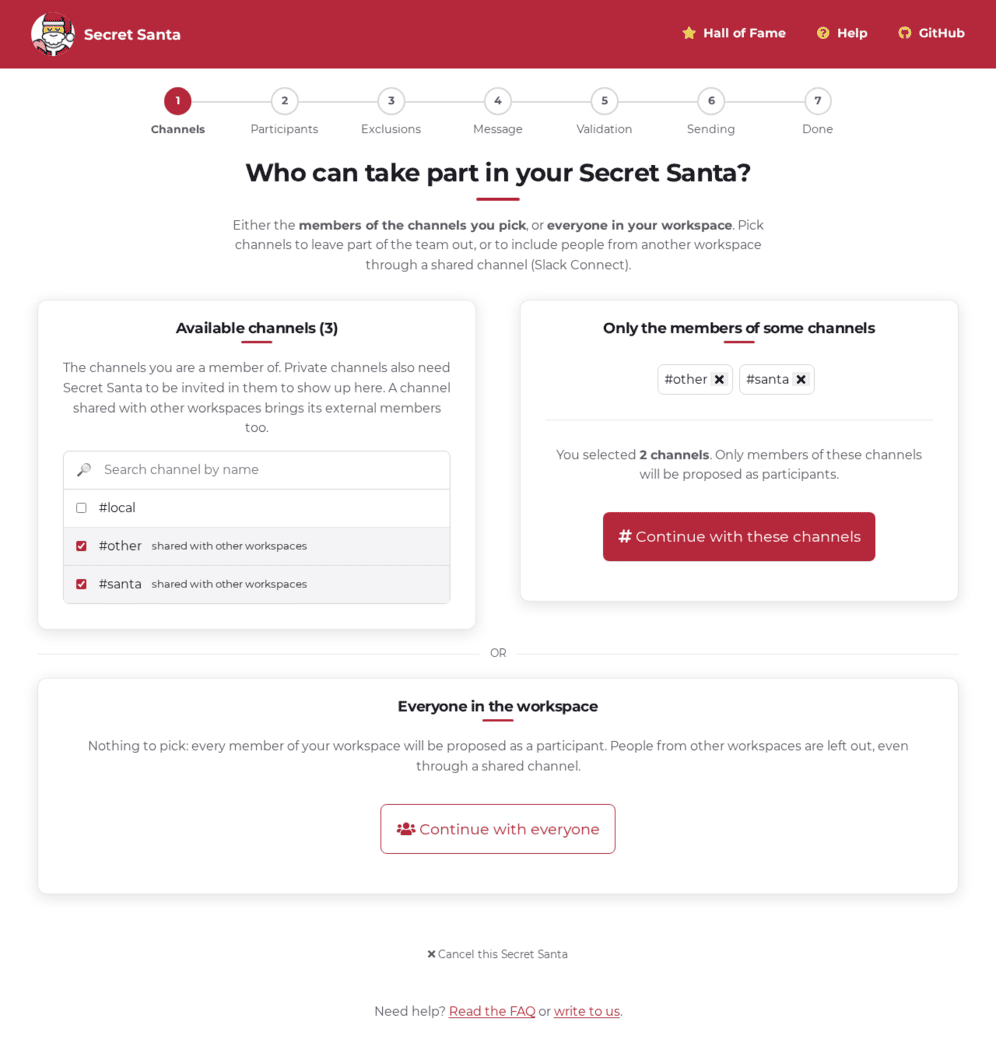
Simple on paper. In practice, Slack has a permission model that has to be followed to the letter, and we learned three things along the way.
The list of channels has to be the admin’s, not the organization’s: We call users.conversations for the signed-in user: they only see the channels they are a member of, and private ones only when the bot has been invited too. That is Slack’s privacy model, and rightly so: Secret Santa must not let you list people you could not see yourself.
A bot can only message an external user if it shares a channel with them: If you select a shared channel where Secret Santa has not been invited yet, the app tells you, explains what to do, and lets you refresh the page once the invitation is done. Another subtlety: posting straight to an external user’s id fails with channel_not_found. You first have to open a DM with conversations.open, then post to the conversation you get back.
New scopes do not apply retroactively: This feature needs four more permissions on the Slack app (channels:read, groups:read, im:write, team:read). A workspace that approved the previous version of the app signs its users in with a token that lacks them, and we found out on our preprod with a lovely 500 on the channels step. The granted scopes are now checked at sign-in, with a message asking a workspace admin to approve the new permissions.
External members, missing from users.list, are loaded through users.info in batches of 25, inside the existing loading loop that already shows a progress bar for big teams. Every selected channel also becomes a group on the participants page, so you can tick or untick a whole team in one click.
On to the second long-standing request.
Section intitulée exclusions-for-real-this-timeExclusions, for real this time
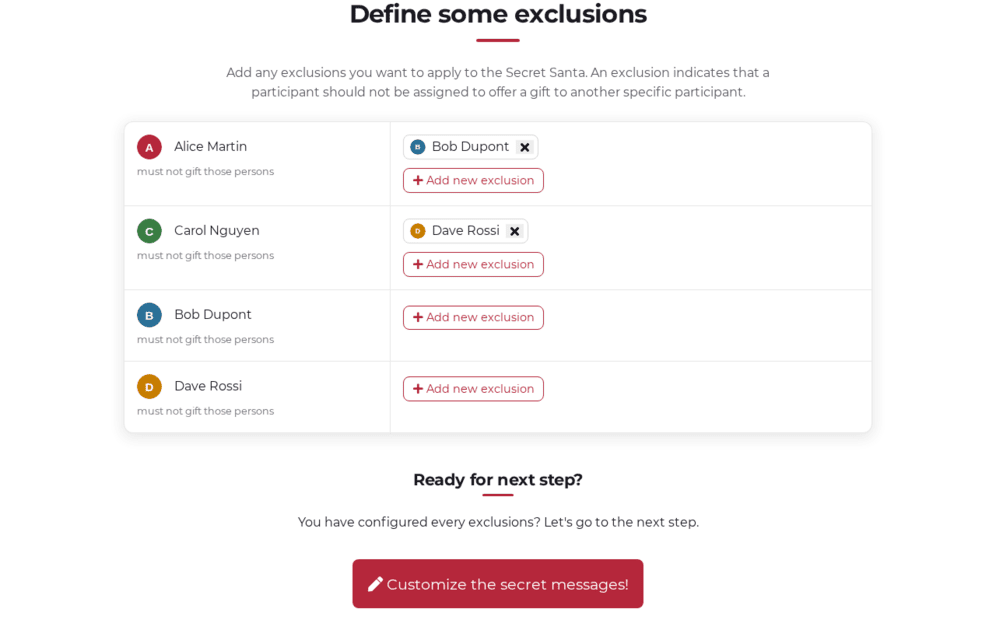
It is one of the most requested features of the project, and that ticket also dated back to late 2019: preventing certain pairings. A couple who would rather not draw each other, a manager and their team, two people who already exchanged gifts last year. The important part is to never reveal the draw itself: you declare rules, not results.
We shipped it at the end of October 2025, just before the season, for our own internal draw. And we switched it off two days later 😝. The draw was correct in the strict sense, everyone gave to someone and received from exactly one person, but the algorithm could produce several loops: Alice gives to Bob who gives to Alice, and the other eight form a second circle of their own. Technically valid, humanly disappointing: to me, the charm of a Secret Santa is that everyone is linked in one big chain.
Without exclusions, the problem does not exist: shuffle the list, everyone gives to the next person, the last one gives to the first. One single circle, by construction. As soon as you forbid some pairs, that trick stops working: the next person in the list may be exactly the one you excluded, and you need an order that avoids every forbidden pair while still closing the loop on the first person.
The version running since August 2026 builds the circle step by step. Start with one person, pick at random an allowed receiver among those not yet in the chain, and continue from that receiver. When you hit a dead end, someone whose every possible receiver is already taken, step back one notch and try another choice. Once everyone is in, the last person still has to be allowed to give to the first, otherwise step back again. The randomness at every step guarantees that two draws with the same participants and the same exclusions do not give the same result.
For the curious, the fancy name for what we are looking for is a Hamiltonian cycle in the graph of allowed pairings, and the “try, get stuck, step back” method is called backtracking. Nothing new under the tree, but it helps to know what to search for.
This kind of search can blow up on twisted exclusions, say one person excluded by almost everyone. Rather than letting PHP grind until the timeout, we count the attempts and give up past 100,000, then restart from another starting point, ten times at most. If nothing comes out, the organizer gets a clear message inviting them to review their exclusions, instead of an error page.
A randomized test locks it all down: it generates participants, hides a valid circle among arbitrary exclusions, and checks that the result always forms a single loop.
Since the feature came back, more than 180 draws have used exclusions. And for big draws, the dialog to add an exclusion was reworked in October: search by name, and multi-select in one click.
Section intitulée a-new-lookA new look
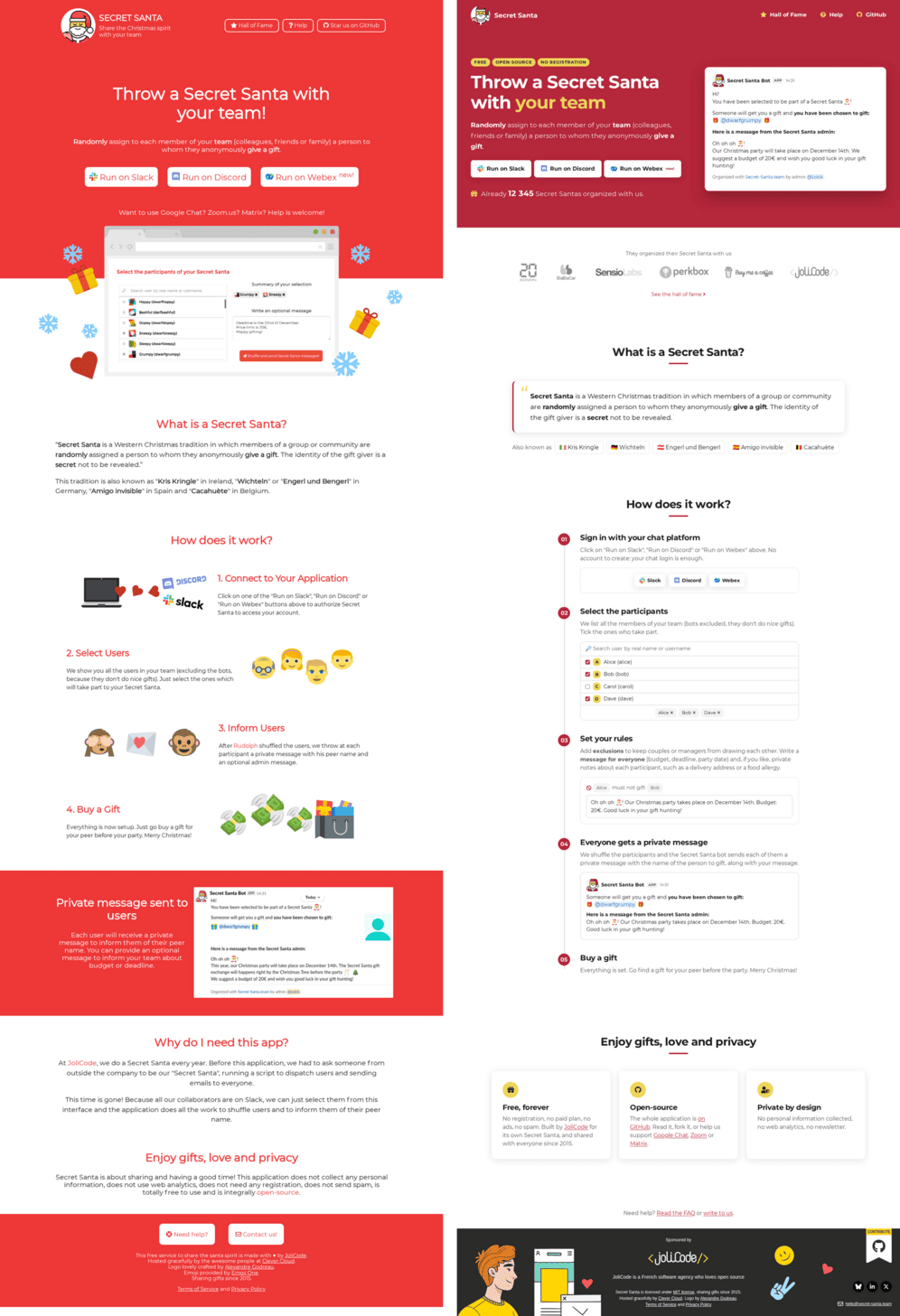
The design had barely moved since the early days, and it was starting to show: tomato red, emoji snowflakes and gifts, a screenshot of the app as the hero illustration, and a “Why do I need this app?” section telling our life story. The whole site has been redone, public pages as well as the draw flow and the error pages.
The new red is deeper and flat, no gradient, no pattern. The rest of the page is white, with soft-shadowed cards for content blocks, and yellow for the accents: the “free, open-source, no registration” badges, the “your team” in the title, the icons of the three promises at the bottom of the page. The hero shows the actual private message a participant receives, rather than a screenshot of the interface. The emoji gave way to a numbered timeline walking through the five steps, exclusions included, with a real slice of the interface for each. The draw flow swaps its chevron breadcrumb for a stepper with numbered dots.
A facelift is also the right time for an accessibility audit. We ran one on the new design before putting it online, and it fixed several things we would not have spotted on our own: links inside text are underlined again, the content sits in a proper <main>, the secondary text on red and the light gray pass the AA contrast ratio, the menu targets are 44 pixels tall, and external links announce that they open a new tab.
Section intitulée the-small-things-that-matterThe small things that matter
Beyond the three big projects, a handful of fixes that make organizers’ lives easier:
- sending no longer stops at the first failure. One participant refusing private messages on Discord blocked everyone after them in the list, and the finish page showed all of them as “not received yet” while only one had actually been tried. That Discord ticket dated back to 2023. Sending now keeps going, and “Retry” only retries the failures;
- a real page when the OAuth sign-in fails. When Slack or Discord answered with an error during the token exchange, we showed our generic error page, as if the app had crashed. The failure is almost always transient and on the provider’s side: the new page says so in plain words, offers to try again, and gives the cause in understandable terms;
- starting over from the homepage really starts over. A draw abandoned halfway left its context in the session, and the homepage button sent you straight to the participants step, with the channels from last time. Every new draw now goes through the first step again;
- the privacy policy now spells out what we collect, and what we do not do with it. A good occasion to repeat the principle that has not changed in ten years: the app has no database. The participant list, the message and the result of the draw live in your session, stored in Redis for three hours, then everything is wiped. Only anonymous counters remain. We now show the total number of draws on the homepage, by the way.
Section intitulée under-the-hoodUnder the hood
And for those who get their hands into the code, we cleaned up there too.
Section intitulée the-whole-stack-up-to-dateThe whole stack up to date
The app now runs on PHP 8.5 and Symfony 8.1. The two upgrades came together, somewhat forced: Symfony 8.0 was reaching end of life with an unpatched CVE on http-foundation, and phpspec 8.1 refused PHP 8.5. We took the opportunity to drop the homemade forks of a few dependencies we had been dragging along for years, and to bring the local Docker stack in line with our docker-starter.
Section intitulée assetmapper-instead-of-inline-scriptsAssetMapper instead of inline scripts
Until now, the frontend was <script> blocks in the Twig templates and libraries vendored by hand in public/. Everything moved to AssetMapper: one ES module per page plus shared helpers, data passed through data-* attributes, one stylesheet per family of pages, and Bugsnag or flatpickr declared in the importmap and downloaded at install time. Every file is versioned with a digest in its name, which let us delete our homemade asset versioning.
Our CSP is strict: a script only runs if it carries the nonce generated for the request, and nothing loads from a third-party domain. AssetMapper did not plan for that in two places:
- by default, it injects into the page a polyfill for browsers that do not understand importmaps, loaded from a CDN. The CSP blocks it, and anyway every browser we support understands importmaps natively: we disabled it. The other generated
<script>tags get the nonce through the option built for that in theimportmap()Twig function; - an
import './style.css'in a JavaScript module is turned by AssetMapper into a fake module that appends the stylesheet to the document, served as adata:URL. Again, the CSP says no. Library stylesheets, flatpickr’s in our case, are therefore linked the classic way with a<link>in the template rather than imported from JavaScript.
Info
Clever Cloud, which kindly hosts the app, runs composer install with --no-scripts. The importmap:install and asset-map:compile commands therefore run in a post-build hook, declared through the CC_POST_BUILD_HOOK environment variable.
Section intitulée end-to-end-tests-screenshots-includedEnd-to-end tests, screenshots included
The project had unit and functional tests, but nothing ran a complete draw in a real browser. That is now done with playwright-php: a full journey for each of the three platforms, against mocked APIs, from sign-in to the finish page.
And since we were about to redo the whole design, we added visual regression tests just before: full-page screenshots of every step and every public page, compared with references versioned in the repository. Our previous article (in French) detailed the method with the Node version of Playwright. At the time, playwright-php had no equivalent of toHaveScreenshot(), so the comparison is done in PHP with gd. A fast path when the files are byte-identical, otherwise a pixel-by-pixel diff with a small tolerance, and the expected, actual and diff images uploaded as a CI artifact when it breaks.
Info
Five days after our merge, playwright-php 1.6.0 shipped exactly that assertion, baselines, masks and diff images included. Our homemade trait will have lived a month, and that is fine by us: the next step is to delete it.
The references are rendered by a Chromium installed in the Docker image, so they are only reproducible from there, and a Castor task regenerates them after an intended UI change. The redesign was the first to benefit: every page was reviewed screenshot by screenshot before going to production.
Section intitulée wrapping-upWrapping up
Here is what 2026 brought to Secret Santa:
- exclusions that guarantee a single circle, with an algorithm that knows how to step back when it gets stuck;
- draws across several Slack workspaces through shared channels, while respecting Slack’s permission model;
- a design brought up to date;
- sending that no longer stops at the first stubborn participant;
- PHP 8.5, Symfony 8.1, AssetMapper, and an end-to-end test suite with visual regression so we never ship a broken step without noticing.
The code is on GitHub under the MIT license, the issues are open, and if your team uses Secret Santa, the Hall of Fame is waiting for you. Happy drawing 🎁
Commentaires et discussions
Nos articles sur le même sujet
Introducing Secret Santa for Webex by Cisco
A new way to spread joy in the hybrid work experience 🎅 The holiday season is here, and we know how challenging it can be to celebrate with your coworkers. That’s why we are excited to announce the launch of Secret…
par Damien Alexandre
A Slack application to launch a Secret Santa
At JoliCode, we aim to keep a really great atmosphere in our offices and between our collaborators. In addition to our frequent JoliDrinks©, we organize a lot of internal events and Christmas is no exception. Each…
par Loïck Piera